Getting Started with Your FIDO2 SecureKey™
Register and Authenticate to Websites
Using your new security key for web based FIDO2 authentication is as easy as 1-2-3.
Step 1: Login
Open your web browser and access your desired application that supports two-step authentication (ie Facebook, GSuite)
Step 2: Register
Follow the step-by-step instructions that are provided to register your FIDO2 key
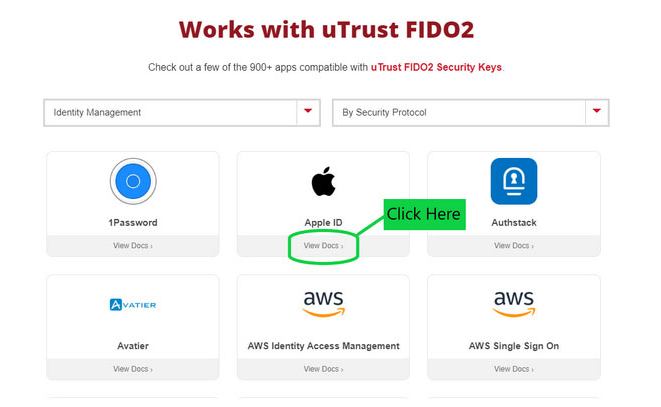
In most instances this information is located under the “Security” tab on the website; you can access detailed instructions for your desired web service by navigating to our “Works with uTrust FIDO” page and clicking on “View Docs”, or going to the application website and searching for their FIDO/FIDO2 security key registration instructions. (as in the image below).
Step 3: Success
Carry your uTrust FIDO2 Security Key for strong authentication wherever you go!
For additional information, view our uTrust FIDO2 Security Key FAQ page.
Hirsch recommends enrolling a second uTrust FIDO2 security key as a backup in the event your primary security key fails. Having a backup key may prevent you from being locked out of your account.
Learn More About Hirsch Security Keys/Cards and Their Capabilities
Explore detailed information about each Security Key, including supported standards, connection types, and use cases for enterprise and government environments.
Learn More Now
Manage Your Security Key
Download the free SecureKey Manager tool on your desktop or laptop to configure your Security Key.
-
Check the firmware version of your key(s)
-
Display the serial number of your key(s)
-
Change/Reset the FIDO2 pin
-
Load the shared secret for OTP
-
Manage your PIV certificates and PIN/PUK (only supported on NFC+ model)
Register for Windows Login
With Hirsch’s Windows Login software, we make it easy to enable your SecureKey as a second factor to authenticate to your local Windows account.
- Install Hirsch’s Windows Login Software
- Reboot and launch the user friendly interface
- Insert your security key and enable it for 1 or more local user accounts
** Hirsch recommends enrolling a second security key as a backup in the event your primary security key fails. Having a backup key may prevent you from being locked out of your account. Buy a two pack and save.